Introduction
Enterprise AI has entered a new phase.
What is a No-Code AI workflow platform?
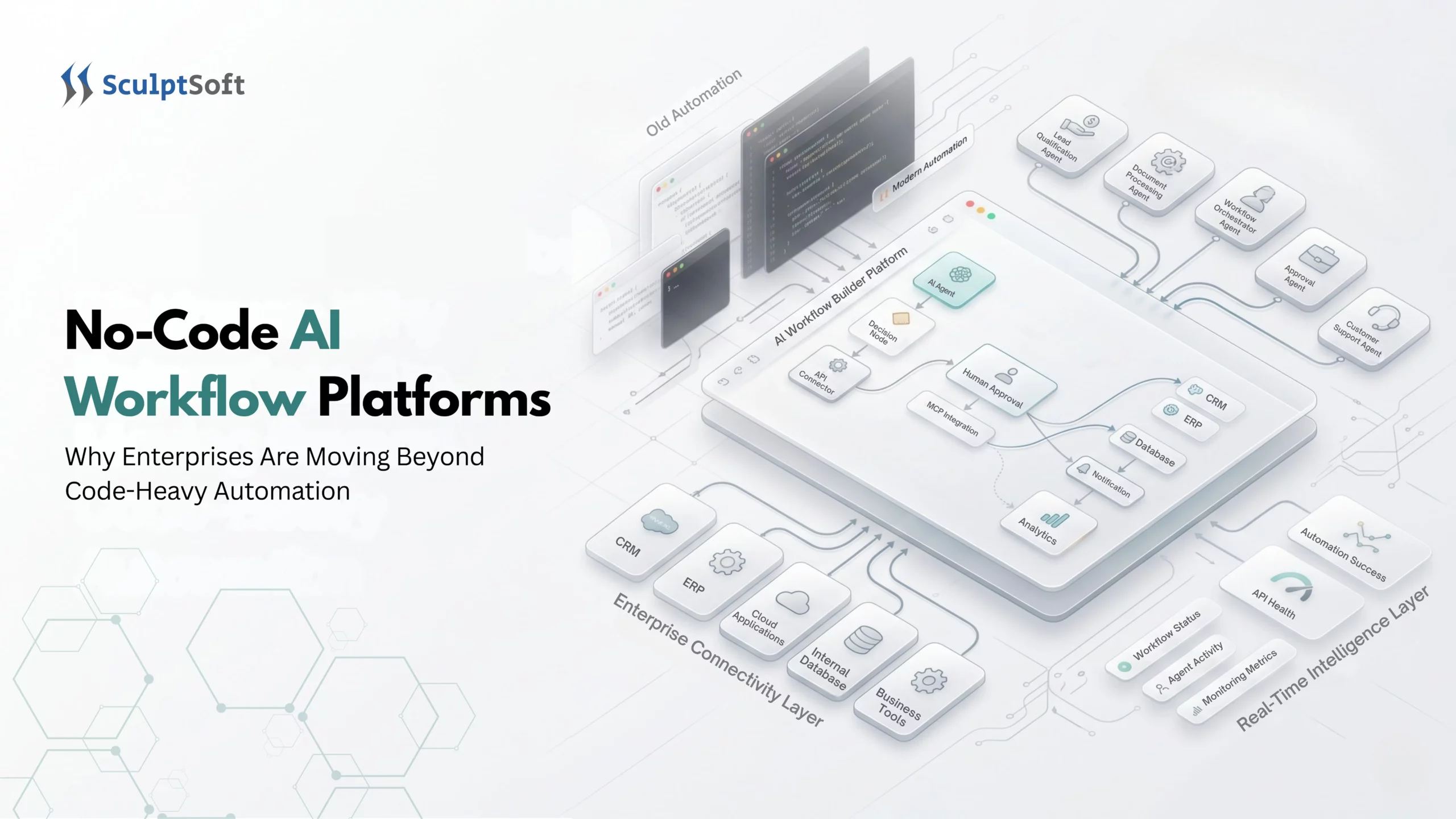
A No-Code AI workflow platform is a software solution that enables businesses to build, automate, and manage AI-powered workflows using visual drag-and-drop interfaces instead of traditional programming. These platforms integrate with Large Language Models (LLMs), business applications, APIs, and databases, allowing organizations to deploy AI automation faster while reducing development and maintenance costs.
Today, the conversation has changed. Business leaders no longer ask, “Can we build AI?” They ask, “How quickly can AI solve real business problems?”
Many organizations are accelerating this transition by partnering with experienced providers of AI solutions that can design, integrate, and scale intelligent workflows while aligning with enterprise security and governance requirements.
This shift is driving the rapid adoption of No-Code AI workflow platforms, which allow enterprises to automate complex processes without relying entirely on traditional software development.
Whether it’s customer support, document processing, sales automation, HR onboarding, or knowledge management, organizations increasingly prefer configurable AI workflows over building everything from scratch.
For example, one enterprise dramatically reduced manual effort after implementing AI-powered workflow automation, demonstrating how modern AI solutions can replace time-consuming manual processes.
According to industry research from Gartner, McKinsey, Deloitte, and IDC, enterprises are prioritizing AI platforms that improve speed to value, reduce implementation costs, and enable business users to participate in automation initiatives. The emphasis is no longer just on AI capabilities but on operational efficiency, governance, and measurable business outcomes.
In this article, we’ll explore why enterprises are moving beyond code-heavy automation, where No-Code AI workflow platforms fit into modern digital transformation strategies, when custom development is still the better choice, and how organizations can successfully implement AI workflow automation at scale.
Why Enterprises Are Moving Away from Code-Heavy AI Automation
Building custom AI systems was once considered the gold standard for enterprise innovation. Organizations invested heavily in engineering talent to create bespoke machine learning pipelines, integrate APIs, and orchestrate business logic tailored to their operations.
While custom development provides maximum flexibility, it also introduces significant challenges that become more pronounced as AI adoption expands across departments.
1. Rising Development Costs
Building an enterprise AI workflow often requires a team of backend and frontend developers, AI engineers, data scientists, DevOps engineers, cloud architects, security specialists, and QA engineers. Coordinating these specialized roles increases project costs and complexity. What starts as a simple automation initiative can quickly become a large engineering project with rising budgets, dependencies, and longer delivery timelines.
2. Long Implementation Cycles
Traditional AI workflow development can take several months to reach production, requiring requirement gathering, architecture design, integrations, infrastructure setup, security reviews, model integration, testing, deployment, and user acceptance testing. In rapidly changing markets, these lengthy development cycles can delay business outcomes and reduce the competitive advantage organizations expect from their AI initiatives.
3. Growing Maintenance Burden
AI systems evolve continuously as APIs, LLMs, business rules, and compliance requirements change. Without ongoing maintenance, custom workflows can quickly become outdated, forcing engineering teams to spend more time on upkeep than innovation. McKinsey’s State of AI research emphasizes that organizations gaining the greatest value from AI are focusing on integrating AI into everyday business workflows rather than simply building more sophisticated models. This highlights why enterprises need AI workflows that can evolve without creating a growing maintenance burden.
4. AI Adoption Is Expanding Beyond IT
Enterprise AI increasingly involves non-technical teams across HR, sales, marketing, finance, customer support, legal, and operations. When every workflow depends on engineering resources, IT can become a bottleneck. No-Code AI platforms help distribute innovation across the organization, enabling teams to build automations while IT maintains governance, security, and oversight.
5. Faster Time to Value
Executives increasingly evaluate AI investments by business outcomes, including faster customer responses, reduced manual work, lower operational costs, and improved employee productivity. Organizations that deploy AI workflows within weeks can often realize measurable ROI sooner than those relying on lengthy custom development cycles, accelerating value and reducing operational inefficiencies across teams.
What Is a No-Code AI Workflow Platform?
A No-Code AI workflow platform enables users to design and automate business processes through visual interfaces rather than traditional programming. Users can connect workflow components, configure integrations, and define business logic through visual builders, reducing the need for extensive custom development.
Modern No-Code AI workflow platforms can integrate with LLMs, CRMs, ERPs, document management systems, databases, cloud storage, internal APIs, knowledge bases, messaging platforms, and AI services. Some platforms also support AI agents and RAG-based workflows, allowing organizations to connect multiple systems and automate complex business processes with minimal coding.
Popular No Code platforms include Microsoft Power Automate, Workato, Boomi, UiPath, n8n, Tray.ai, Zapier, and Make. Each platform offers different capabilities, integration ecosystems, governance controls, deployment options, and levels of customization. The right choice depends on an organization’s existing technology stack, security and compliance requirements, technical expertise, workflow complexity, and long-term automation goals.
Organizations implementing enterprise-grade automation may also combine No-Code platforms with custom AI development to support specialized workflows, advanced integrations, or requirements that cannot be effectively addressed through platform-native capabilities.
Why Custom AI Pipelines Are Becoming Unsustainable
Custom AI development remains valuable for highly specialized applications, but many organizations are realizing that maintaining custom pipelines across dozens or even hundreds of workflows is increasingly impractical.
Engineering Resources Are Limited
Engineering teams already manage product development, infrastructure, security, DevOps, customer features, and technical debt. Adding every AI automation request to their backlog only slows business innovation.
AI Is Evolving Too Quickly
AI technologies are advancing rapidly, making custom AI solutions increasingly difficult to maintain. No-Code AI workflow platforms can reduce this burden by simplifying model integrations and workflow updates, allowing teams to adapt with less redevelopment.
Integration Complexity Increases Over Time
Enterprise workflows connect multiple systems, such as CRMs, ERPs, AI models, databases, and email systems. Managing these integrations with custom code increases maintenance, testing, and security complexity.
Compliance Requirements Continue to Grow
Enterprise AI must comply with standards like GDPR, HIPAA, SOC 2, and ISO 27001. No-Code platforms simplify governance, audits, and policy enforcement across AI workflows.
No-Code AI Workflow Platforms vs. Custom Development
Why are enterprises moving to No-Code AI workflow platforms? Enterprises adopt No-Code AI workflow platforms to deploy AI faster, reduce costs, and minimize coding. They also simplify integrations while improving governance, scalability, and operational efficiency.
Choosing between a No-Code AI workflow platform and custom development depends on your organization’s goals, complexity, compliance requirements, and available engineering resources.
Today, enterprises can choose from a growing ecosystem of No-Code AI workflow platforms. Solutions such as Microsoft Power Automate, Workato, UiPath, Boomi, n8n, and Tray.ai provide visual workflow builders, AI integrations, and enterprise governance features. However, selecting the right platform depends on factors such as scalability, security, integration capabilities, and business requirements.
| Criteria | No-Code AI Workflow Platform | Custom Development |
|---|---|---|
| Development Speed | Days to Weeks | Months |
| Initial Investment | Lower | Higher |
| Maintenance | Platform Managed | Internal Team |
| Flexibility | High (within platform capabilities) | Unlimited |
| Security Controls | Built-in Enterprise Features | Fully Customizable |
| Business User Involvement | High | Low |
| Scalability | High | High (requires engineering effort) |
| Governance | Centralized | Must Be Built |
| AI Integrations | Prebuilt Connectors | Manual Development |
| Time to ROI | Faster | Slower |
Criteria
Development Speed
No-code AI Workflow Platform
Days to Weeks
Custom Development
Months
Criteria
Initial Investment
No-code AI Workflow Platform
Lower
Custom Development
Higher
Criteria
Maintenance
No-code AI Workflow Platform
Platform Managed
Custom Development
Internal Team
Criteria
Flexibility
No-code AI Workflow Platform
High (within platform capabilities)
Custom Development
Unlimited
Criteria
Security Controls
No-code AI Workflow Platform
Built-in Enterprise Features
Custom Development
Fully Customizable
Criteria
Business User Involvement
No-code AI Workflow Platform
High
Custom Development
Low
Criteria
Scalability
No-code AI Workflow Platform
High
Custom Development
High (requires engineering effort)
Criteria
Governance
No-code AI Workflow Platform
Centralized
Custom Development
Must Be Built
Criteria
AI Integrations
No-code AI Workflow Platform
Prebuilt Connectors
Custom Development
Manual Development
Criteria
Time to ROI
No-code AI Workflow Platform
Faster
Custom Development
Slower
Which Approach Is Right for You?
- Choose No-Code AI Workflow Platforms to accelerate AI adoption, empower business teams, reduce engineering backlogs, standardize governance, and lower maintenance costs.
- Choose Custom Development when proprietary models, specialized logic, ultralow latency, unique infrastructure, or complete control over every component is essential.
For many enterprises, the optimal strategy is a hybrid approach using No-Code platforms for common workflows while reserving custom development for mission-critical or highly specialized applications. We’ll explore this architecture later in the article.
Enterprise Concerns: Security & Scalability
Are No-Code AI workflow platforms secure for enterprises? Yes. Enterprise-grade No-Code AI workflow platforms include security features such as role-based access control (RBAC), single sign-on (SSO), encryption, audit logs, compliance support, and centralized governance. These capabilities help organizations protect sensitive data while securely scaling AI automation across departments.
For enterprise leaders, adopting a No-Code AI workflow platform involves more than ease of use. Security, compliance, scalability, and governance are critical considerations when evaluating a platform for production use. The assumption that No-Code necessarily means less secure is also too simplistic.
Many enterprise-oriented platforms provide controls such as role-based access, identity management, encryption, audit logging, and centralized governance, although the specific capabilities and compliance certifications vary by provider and plan.
Microsoft’s guidance on responsible AI emphasizes the importance of governance, accountability, transparency, and risk management throughout the AI lifecycle, reinforcing why these controls should be considered when deploying AI workflows at scale.
Security Comes First
Before deploying AI into production, organizations must ensure that sensitive business and customer data remains protected throughout the workflow lifecycle. Enterprise-ready platforms typically include:
- Role-Based Access Control (RBAC): Restrict workflow creation, editing, and execution based on user roles.
- Single Sign-On (SSO): Integrate with enterprise identity providers such as Azure Active Directory, Okta, or Google Workspace.
- Encryption: Protect data both at rest and in transit using industry-standard encryption protocols.
- Audit Trails: Maintain detailed logs of workflow execution, user actions, and AI interactions to support compliance and troubleshooting.
- Data Residency Options: Meet regional regulatory requirements by controlling where data is stored and processed.
These capabilities help organizations maintain governance while empowering teams to innovate responsibly.
Scalability Without Complexity
AI adoption expands beyond pilots into multiple departments, requiring scalable platforms that support high-volume workflows, integrations, collaboration, monitoring, version control, and reusable governance policies to accelerate future deployments.
AI Governance Is No Longer Optional
As AI enters core business processes, organizations need strong governance to monitor models, data access, workflow permissions, output reviews, and policy compliance, building trust while reducing risks.
ROI by Department: Where No-Code AI Delivers the Greatest Value
One of the biggest advantages of No-Code AI workflow platforms is their versatility. Instead of solving a single business problem, they can automate repetitive tasks across multiple departments.
Customer Support
Customer service teams handle thousands of repetitive inquiries every month. AI workflows can automatically classify incoming requests, retrieve relevant knowledge base articles, generate draft responses, and route complex cases to human agents.
Business Outcomes: Faster responses, lower support costs, higher customer satisfaction, and improved agent productivity through intelligent workflow automation.
Sales
Sales representatives spend a significant portion of their day updating CRM records, qualifying leads, preparing proposals, and following up with prospects. AI workflows can automate lead qualification, meeting summaries, proposal drafting, email generation, CRM updates, and opportunity scoring.
This allows sales teams to focus more on relationship building and revenue generation.
Human Resources
HR departments manage numerous administrative tasks, from onboarding new employees to answering policy-related questions.
AI workflows streamline onboarding, screening, verification, leave processing, and HR support, improving efficiency while creating better employee experiences.
Finance
Finance teams often process invoices, reconcile transactions, and generate reports.
AI workflows automate financial processes, reducing manual errors, accelerating reporting, simplifying compliance, and improving overall operational efficiency.
Operations
Operations teams coordinate processes across departments and systems.
AI workflows automate approvals, inventory alerts, incident management, vendor onboarding, and maintenance, minimizing manual intervention while improving operational efficiency.
How to Evaluate and Implement a No-Code AI Workflow Platform
Selecting the right platform is only the first step. Organizations should evaluate whether the solution meets their technical, security, integration, scalability, and governance requirements, then follow a structured approach to move from an initial pilot to production deployment.
When evaluating a No-Code AI workflow platform, consider its AI capabilities, integration options, security controls, scalability, user experience, governance features, observability, and vendor support. It is also important to assess data privacy, access controls, auditability, monitoring, error handling, and human oversight. A platform that performs well in a proof of concept should also demonstrate reliability under production workloads and integrate effectively with existing enterprise systems.
Organizations should also assess support for testing, deployment, version management, performance monitoring, and ongoing maintenance. Interoperability, data portability, vendor dependencies, and service-level commitments can also influence the platform’s long-term suitability.
Phase 1: Identify High-Impact Use Cases
Start with workflows that are repetitive, rule-based, and time-consuming. Examples include customer support ticket routing, invoice processing, or employee onboarding.
Phase 2: Build a Pilot
Develop a proof of concept involving one department or a defined user group. Measure outcomes such as time saved, process accuracy, adoption, and user satisfaction before expanding the solution.
Phase 3: Establish Governance
Define security policies, access controls, approval processes, data-handling requirements, and AI usage guidelines before moving workflows into broader production use.
Phase 4: Scale Across Departments
Reuse validated workflows, templates, and integrations across other business units where applicable. Collaboration between IT, operations, and business teams can help maintain consistency while supporting broader adoption.
Phase 5: Optimize Continuously
Monitor workflow performance, gather user feedback, refine prompts and workflow logic, evaluate model performance, and measure ROI regularly. Continuous optimization helps ensure that AI workflows remain reliable and aligned with changing business requirements.
For enterprises managing large-scale digital transformation initiatives, working with an experienced AI development company can help reduce implementation risks, address complex integration requirements, and accelerate enterprise adoption.
When Custom Development Still Makes Sense
Despite the advantages of No-Code platforms, custom development remains the better choice in certain scenarios.
Choose custom development for proprietary AI models, specialized algorithms, strict real-time latency, complex architectures, and deeper customization beyond standard platform capabilities.
Examples include autonomous robotics, advanced fraud detection engines, large-scale recommendation systems, and custom manufacturing optimization platforms. These workloads may require specialized model architectures, fine-grained control over inference and data pipelines, or direct optimization of performance and resource usage.
Custom development can also make sense when an AI capability is strategically important, relies heavily on proprietary data, or creates a meaningful competitive advantage. However, organizations must also consider the additional engineering expertise, infrastructure, testing, security, monitoring, and ongoing maintenance required to operate these systems reliably in production.
How SculptSoft Helps Enterprises Accelerate AI Transformation
Implementing AI successfully requires more than selecting the right platform; it requires aligning technology with business strategy, governance, and measurable outcomes.
At SculptSoft, we partner with enterprises to design, implement, and optimize AI-powered workflows that deliver tangible business value.
Our approach combines AI readiness assessments, workflow discovery, platform selection, LLM and RAG integration, enterprise integrations, governance, security, optimization, monitoring, and employee enablement for scalable AI adoption.
Rather than replacing existing systems, we help organizations extend their technology investments with intelligent automation that scales across the enterprise.
Whether you’re exploring your first AI initiative or expanding enterprise-wide automation, SculptSoft provides the strategic guidance and technical expertise needed to accelerate transformation with confidence.
Book an AI Workflow Assessment with SculptSoft to identify your highest impact automation opportunities, evaluate your AI readiness, and develop a roadmap tailored to your business goals.
Or schedule a No-Code AI Strategy Session with our experts to explore how intelligent workflow automation can reduce costs, improve productivity, and accelerate innovation across your organization.
Conclusion
The shift toward No-Code AI workflow platforms reflects a broader evolution in enterprise technology.
Organizations are no longer measuring success by how much code they write. Instead, they are focused on how quickly they can solve business problems, improve employee productivity, enhance customer experiences, and generate measurable ROI.
No-Code platforms empower both technical and business teams to collaborate on AI initiatives without creating bottlenecks for engineering departments. Combined with enterprise-grade security, governance, and scalability, they offer a practical path to accelerating AI adoption across the organization.
That said, No-Code isn’t a replacement for every custom solution. The most successful enterprises embrace a hybrid strategy using No-Code platforms for rapid workflow automation while reserving custom development for highly specialized, business-critical applications.
As AI continues to reshape the way organizations operate, enterprises that prioritize agility, governance, and collaboration will be best positioned to lead the next wave of digital transformation.
Frequently Asked Questions
Can No-Code AI Workflow Platforms Replace Custom Development?
Not entirely. No-Code platforms are ideal for automating common business processes quickly, while custom development remains valuable for highly specialized applications requiring unique logic or proprietary AI models.
Are No-Code AI Platforms Secure Enough For Enterprises?
Yes. Enterprise-grade platforms typically provide encryption, role-based access control, audit logs, single sign-on, compliance certifications, and governance features designed to meet enterprise security requirements.
Can I Integrate Large Language Models (LLMs) Without Coding?
Yes. Most modern No-Code AI workflow platforms offer prebuilt integrations with leading LLM providers such as OpenAI, Anthropic, Google Gemini, and Azure OpenAI, allowing users to build AI-powered workflows with minimal technical expertise.
When Should I Choose A Hybrid AI Architecture?
A hybrid approach is recommended when your organization needs both rapid workflow automation and highly customized AI capabilities. Standard processes can run on a No-Code platform, while proprietary applications remain custom-built.